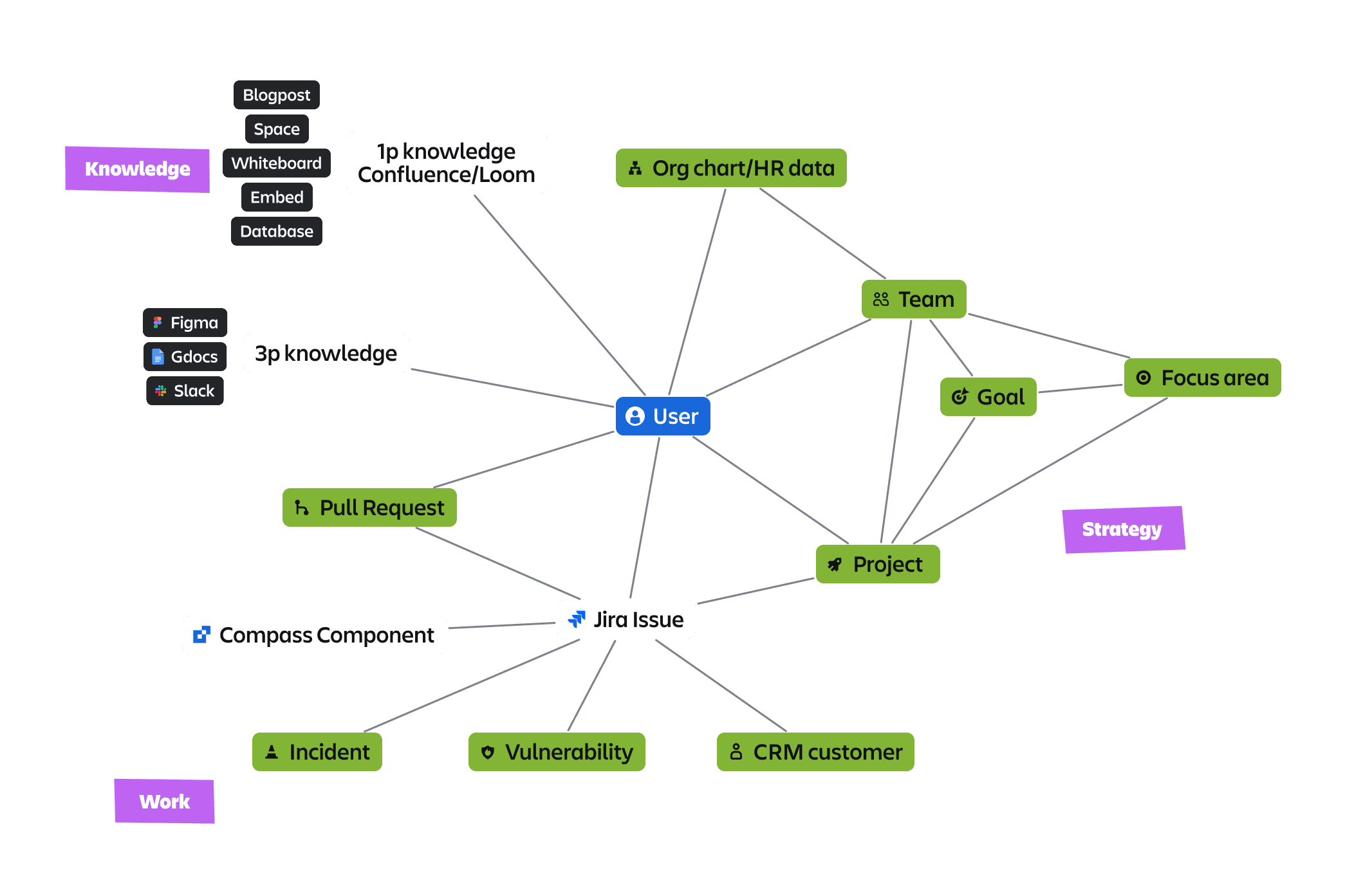
The Teamwork Graph (TwG) team was tasked with building a personalised experience through AI that allows users to visualise, connect, and navigate through related objects in the Teamwork Graph, boosting productivity.
TwG is a platform designed to streamline connected experiences by standardising the ingestion and modelling of data. It supports various use cases, such as search and automation, by leveraging data from different sources through AI, including search and automation, by leveraging data from multiple sources.
Wait. Who is Atlassian?
The company is best known for creating collaboration and productivity tools such as Jira, Confluence, Bitbucket, and Trello, which help teams become more nimble, creative, and aligned.
Period
3 quarters
2024-2025
My Role
Product Designer responsible for the end to end process and contributing to the product roadmap & strategy.
Team
Product Managers,
Lead Designer,
Content Designer, Engineering Manager,
4+ Developers
Tools
Problem
The TwG connects customer information across all the tools they use for work. Today, it is impossible to visualise the depth of this data and use those connections to navigate through the graph to find information and understand context.
We aim to provide a contextual surface that helps users visualise relationships and context from 1P and 3P data sources.
Key results
Lagging:
improved customer navigation
reduced context-switching
increased productivity
TWG user adoption rates
Leading:
average SEQ of 5.67 for Object Navigator user test ()
Graph MAU (Monthly Active Users)
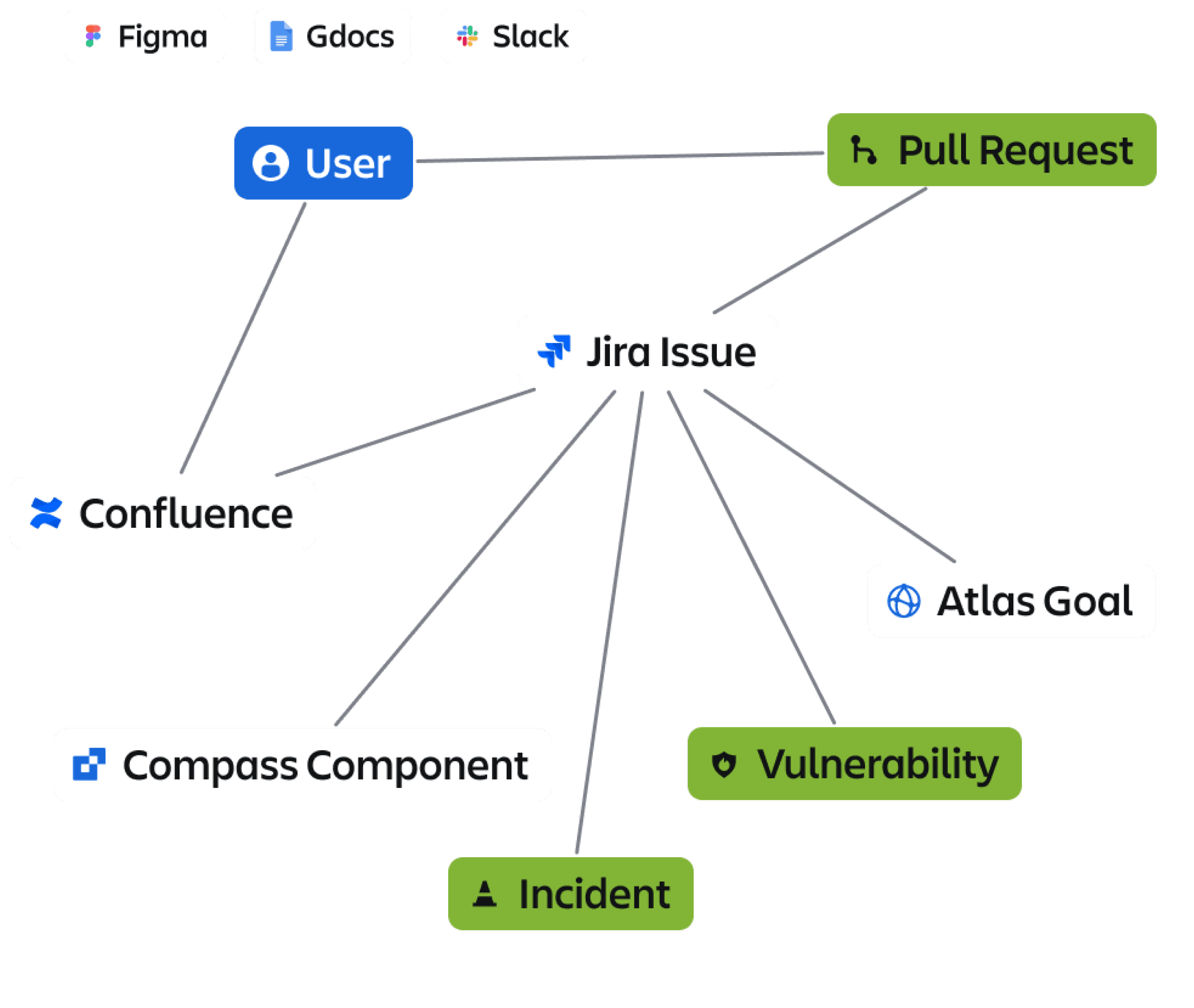
KNOWLEDGE use case
Understand a topic with greater efficiency and depth by surfacing relevant, related information
WORK use case
Success metric
Deliver end-user value by improving navigation of work and knowledge shared between 1P and 3P apps.
Dogfooding release in Jira and Confluence by EO FY25.
💡 What is this work?
Exploratory research was needed to identify the current issues users face across products regarding integration, cross-product collaboration, and task management.
💡 Why did we do this work?
To find immediate and long-term opportunities to adopt the graph and improve these experiences.
Methods:
Qualitative desk research:
Synthesis of 20 research reports completed
Research reports focused on IC’s and operational users (e.g. scrum masters)
Across multiple industries
Internal surveys:
59 respondents across 4 professions
Interviews with product teams:
Interviewed design leads across 20 teams
Understanding key problems they were facing
Research Phase
We conducted an initial research aimed to validate key assumptions & uncover the top problems behind the design of the Work context feature (Object Navigator) to reduce context-switching and improve cross-product visibility.


Operations
Atlassian user


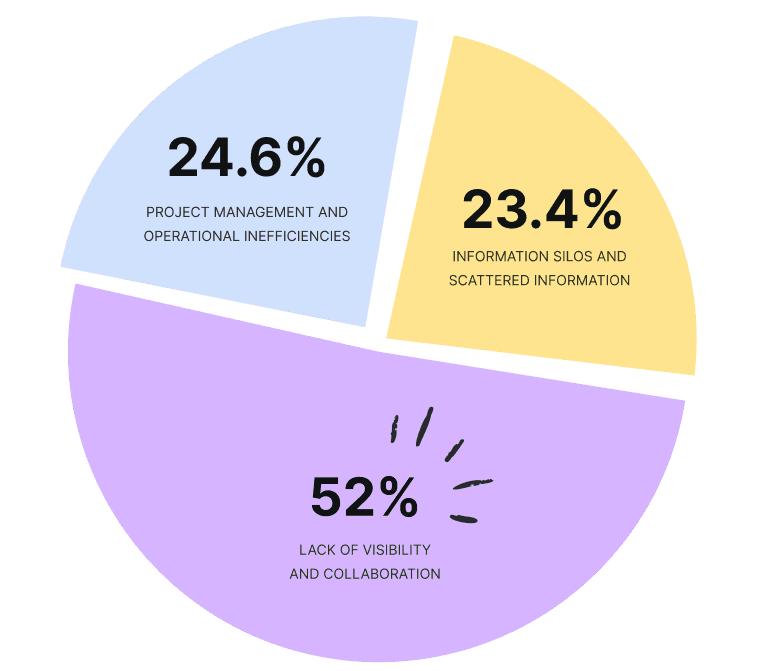
Project management and operational inefficiencies
Project management tasks are burdened by manual process bottlenecks and difficulties in reporting.
Users face challenges in monitoring data for built features and distributing tasks effectively due to scattered information and noise.

@
Leaders
PROBLEM 2
35% of Atlassian’s have struggled to monitor their teams work progress 3-5 times in the last 30 days
(35.6% moderate impact on ability to prioritise tasks in the last 30 days)
33% of Atlassian’s have struggled in prioritising tasks and managing project deadlines 3-5 times in the last 30 days
(49% moderate impact on their ability to do your work effectively)
1. Monitoring data for built features:
Users (especially PMs) find it difficult to oversee, track, and understand if they built the right thing so that they can decide what to do next. This leads to an inability to communicate the features' long-term benefits or risks.
2. Distributing tasks is difficult:
Users struggle to prioritise important projects and see the deadlines for each project so that they can distribute the outstanding tasks to their team. They have too much-scattered information and noise, making them feel miserable and overwhelmed.
3. Reporting:
Users find reporting to stakeholders and managers difficult because they don't have enough visibility of teamwork and project statuses, leading to a lot of manual follow-up before the meeting.
Operations
Atlassian user

Operations
Atlassian user
38% of Atlassian’s found it difficult to access and verify the latest project information 3-5 times in the last 30 days (33% said this had a moderate impact on ability to find information)
1. Tool sprawl:
The use of multiple, uncoordinated tools across teams causes information to be stored in various locations (Google Drive, Slack) without a centralised communication space so employees spend excessive time searching for data.
2. Siloed data/work/team:
Data is scattered across multiple siloed tools and systems, leading to users struggling to find, access and verify essential information.
3. Data import & linking:
It isn't easy to know where are the sources of information in documents due to not well-linked sources and static data import, leading to the user not able to validate the data.
4. Limited integration and linking:
Different tools and platforms don't seamlessly integrate, preventing automatic data sync and leading to manually adding information.
5. Content governance:
It's difficult for new starters to know how to create documentation across platforms because there is no common company rule for content documentation across tools, leads to users creating scattered.
PROBLEM 3
Information silos and scattered information
Users struggle to find, access and verify essential information because data is scattered across multiple siloed tools and systems
@
Leaders

@
ICs
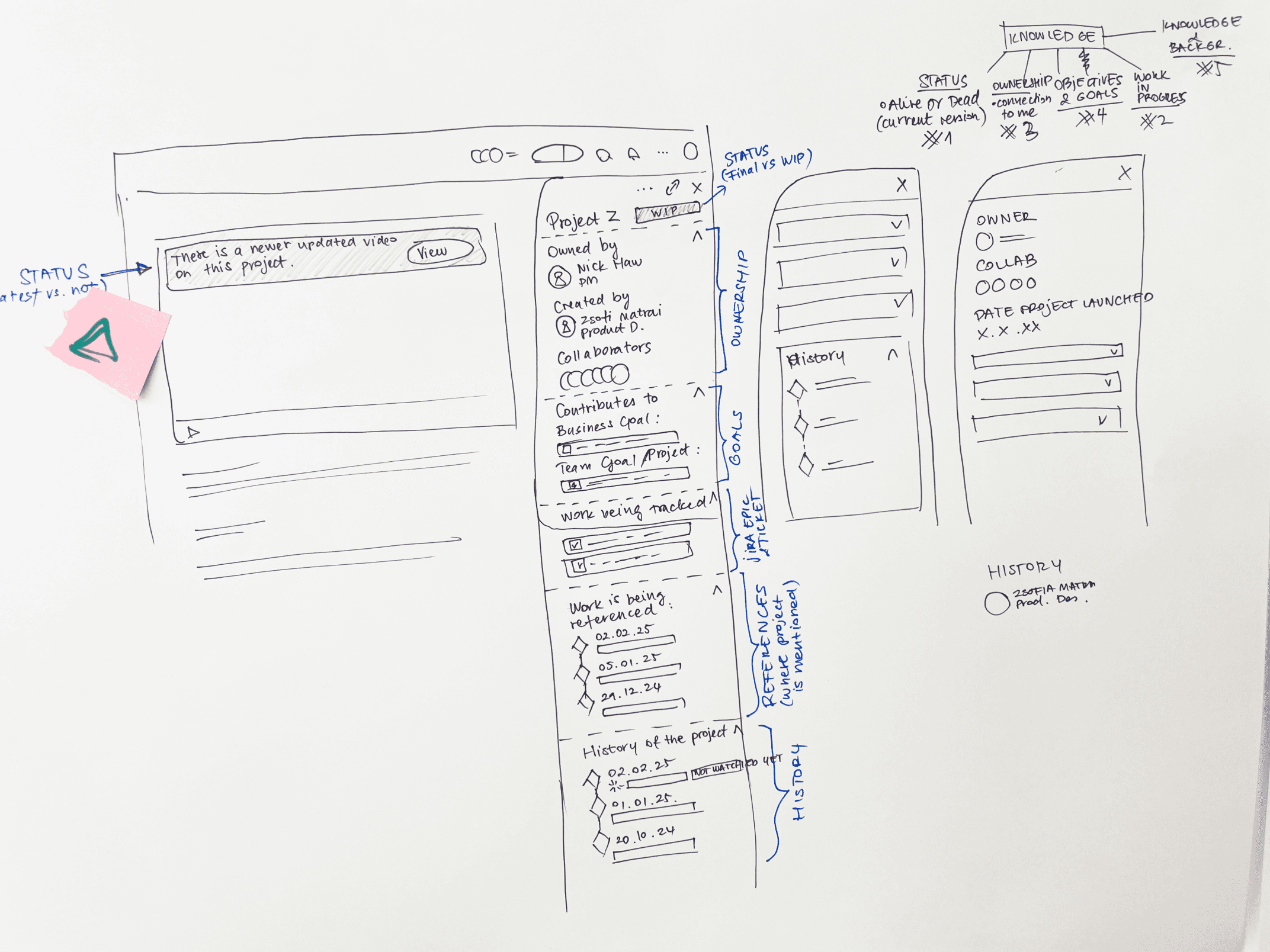
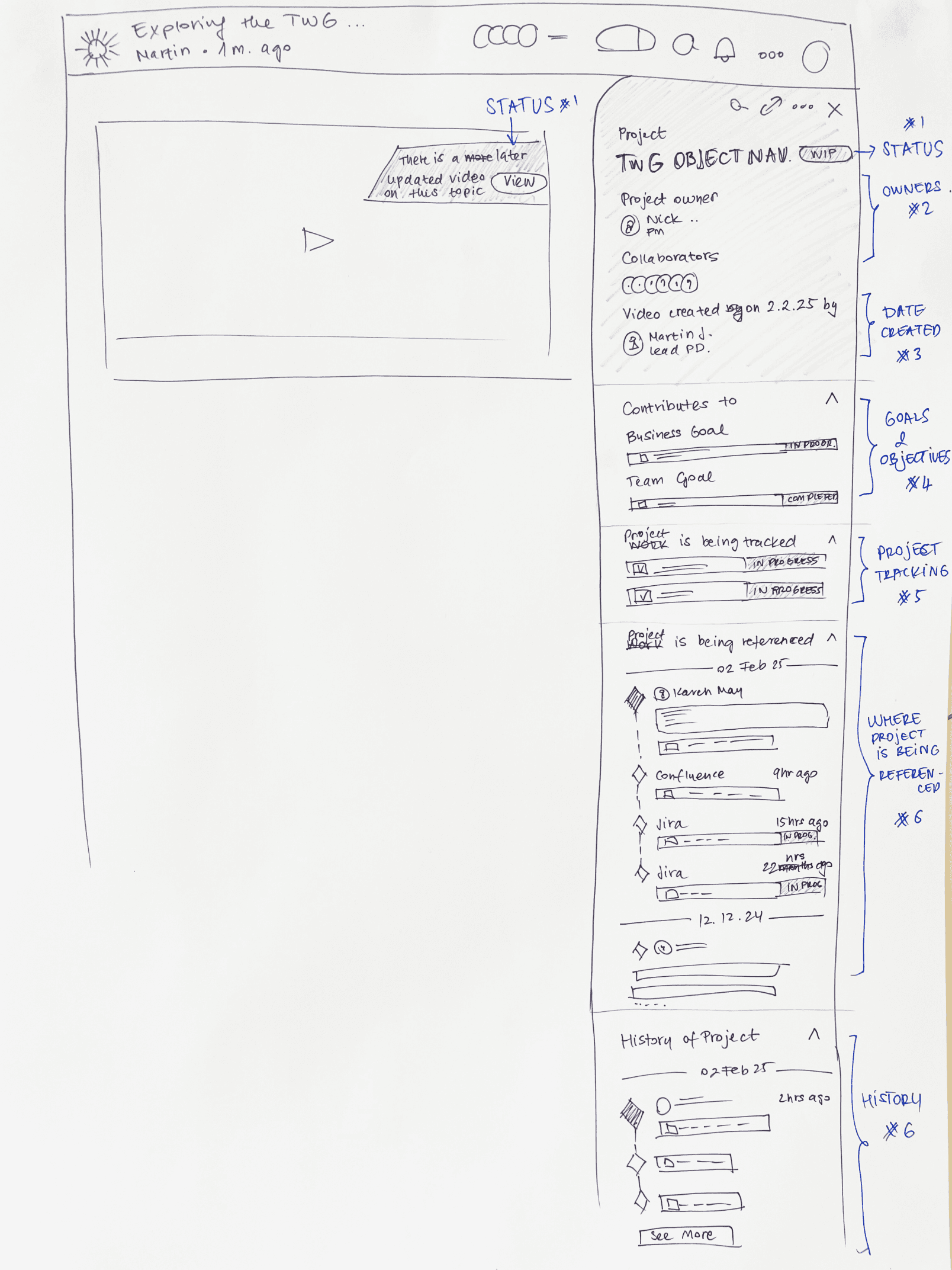
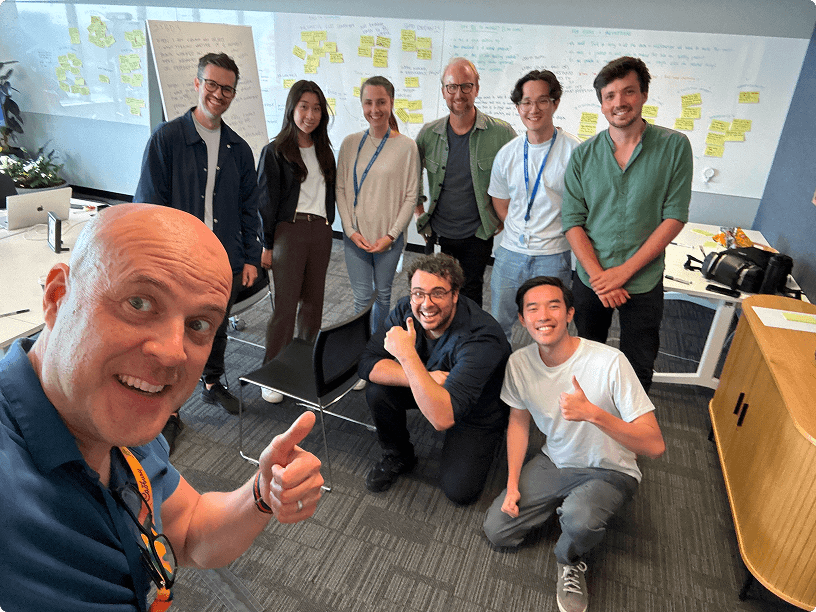
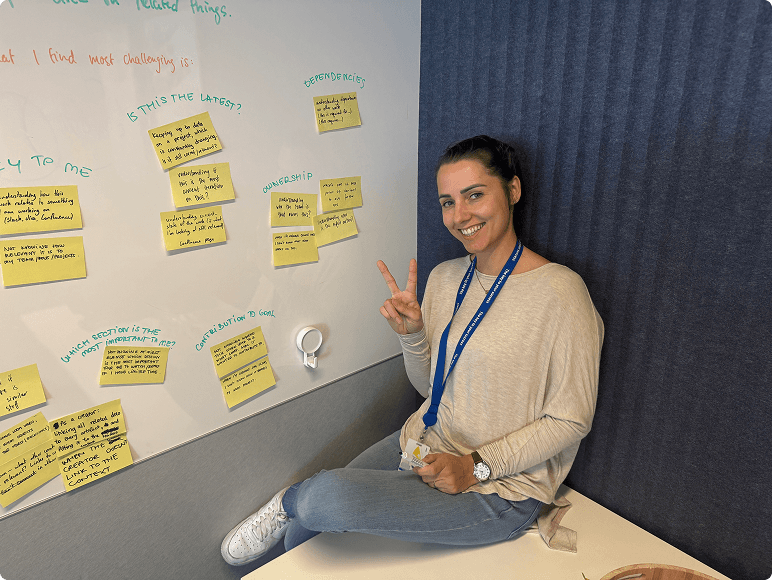
In the second quarter, we kicked off the discovery phase with a Design Sprint week. We conducted an intensive week-long sprint focused on conceptualising an engaging experience for Team ‘25, aimed at making the Teamwork Graph more tangible and meaningful.
💡 Problem was defined
Users struggle with context-switching and accessing related information across tools due to a lack of visibility.
Knowledge workers are surrounded by various objects and apps, trying to get the context she needs.
During onboarding, knowledge workers frantically switch between apps to understand the information.
We want to empower knowledge workers to instantly access context effortlessly, anywhere.
💡 Personas & User Journeys clarified
Focused on knowledge workers, product managers, and developers who frequently switch between Jira, Confluence, and other tools.
💡 Early design concepts
Explored concepts like hierarchical views and grouped information to improve navigation and context.
Collaborated with cross-functional teams to align on the design direction and integration points.
Discovery Phase
1 week Design Sprint
Entry: AI button
Design Phase
After the Design Sprint, with the leadership, we prioritised the Teamwork Graph Object Navigator panel, which we had the highest confidence in, as it would help users provide enough contextual information to get the work done.
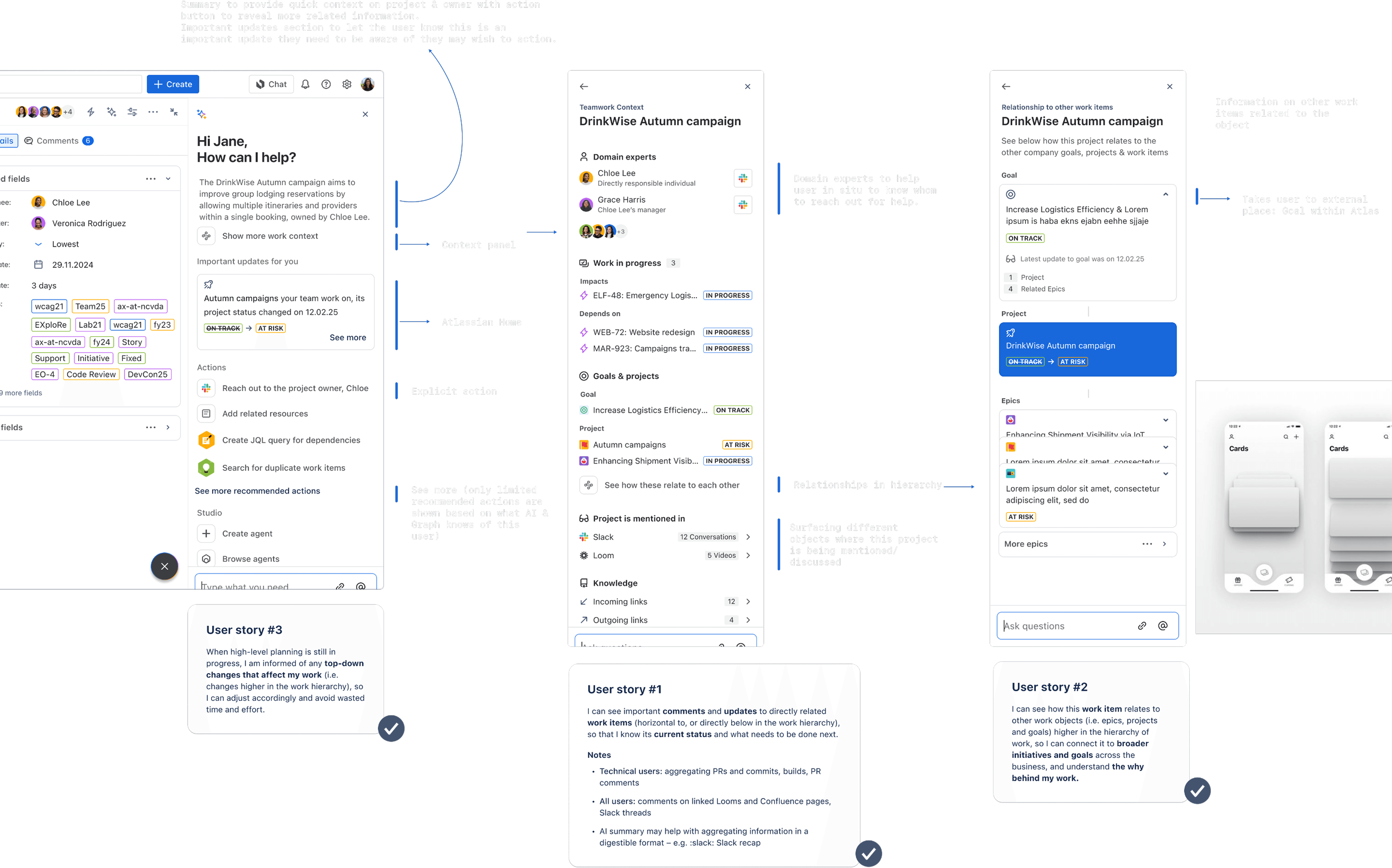
Design Principles:
Clarity & relevance over detail
Traceable & transparent
Actionable
Wireframes & Prototypes:
Developed prototypes for hierarchical and grouped views to test user preferences.
Key Features:
Object navigator, contextual cards, and relationship maps to enhance user experience.
Accessibility:
Ensured designs met A11y requirements for inclusive user experiences.
Based on assumptions and validated artefacts, we compiled a list of Teamwork Graph's core audiences (Admins, Buyers, Developers, Knowledge workers, and Sellers). This artifact supported alignment within and outside the team and serve as a foundational asset for communication across various stakeholders.
TwG Audiences:




As a developer (1P or 3P), I need to perform testing and debugging with live data, so I can efficiently build using the graph.

Knowledge workers
Knowledge workers seeking broader context around a specific object they are viewing. Discovering related work and knowledge.
E.g. Show me the go-to experts for the Topic the page I’m reading relates to
Sellers
As a sales rep, I want to be able to ‘show’ the graph to customers, so they can connect the graph to the tangible value it delivers in product experiences.
Graph Experiences Module Library
Work & Knowledge Context Modules
Graph Visualiser Modules
TWG API Explorer + improved documentation
Developers
Knowledge workers
Power users
Users of TWG-powered experiences that will benefit from understanding how specific objects connect to one other in the graph.
E.g. IT OPs view of software services to trace the root cause of an incident
1P Buyers
As a 1P product team, I need to understand what is in the graph, so I can discover and plan features that take advantage of its capabilities.
Learning/Browsing/Discovering
E.g. What providers supply Pull Requests to TwG and how are they related to other objects?
Testing/Querying/Executing
We took the Object navigator designs for a user test to test our assumptions.
Research Objective
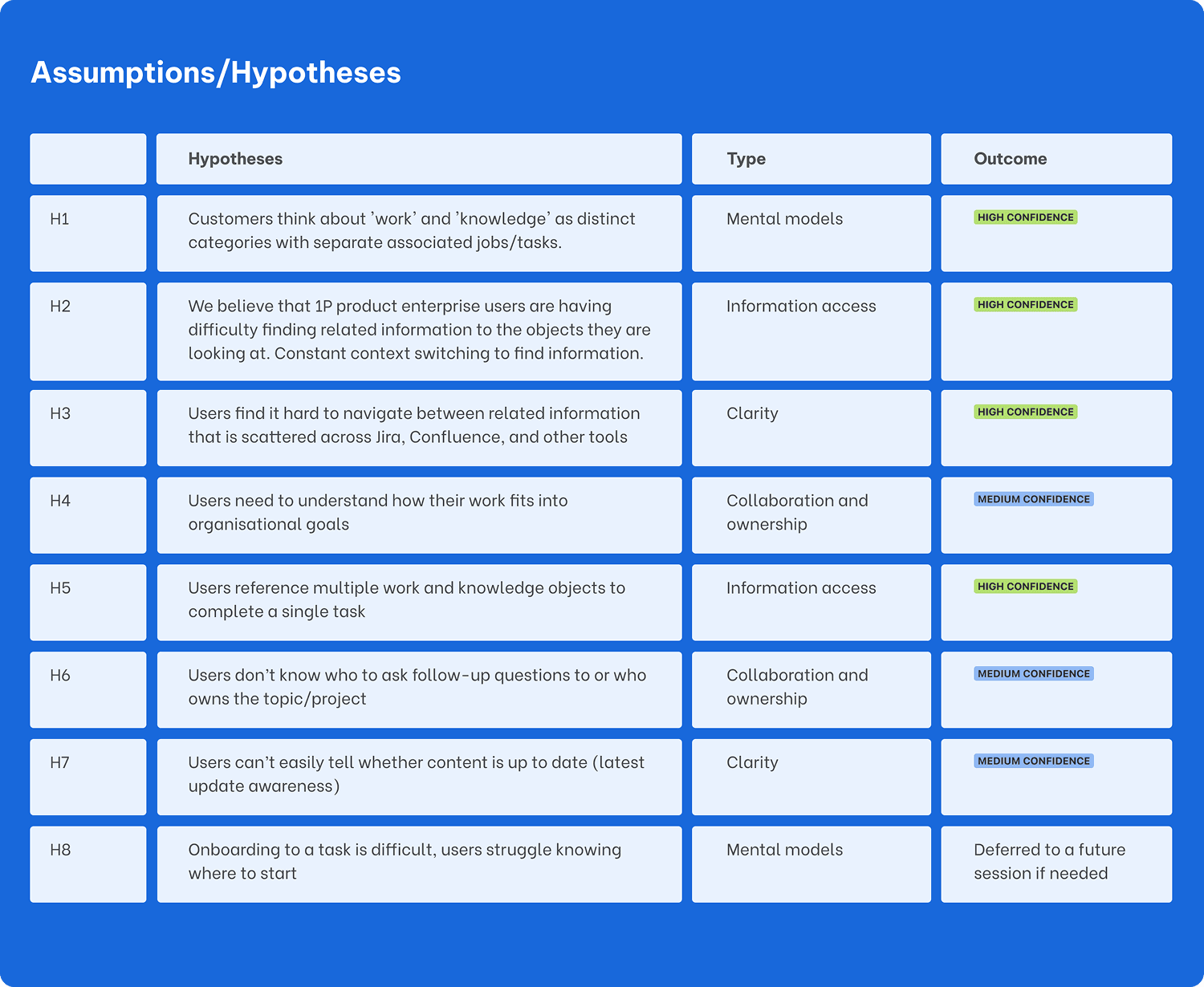
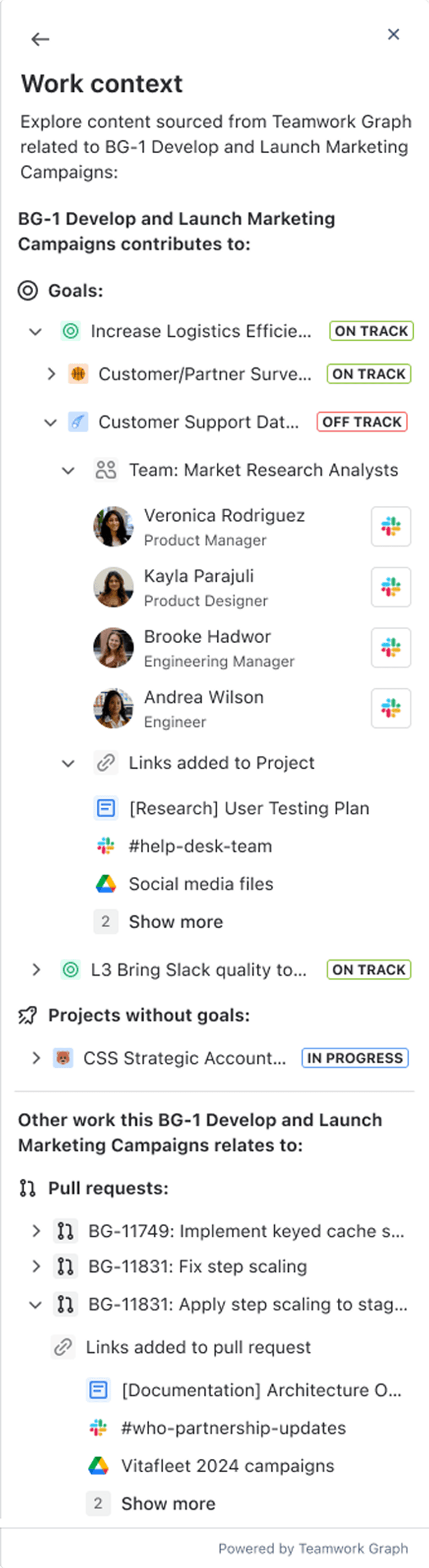
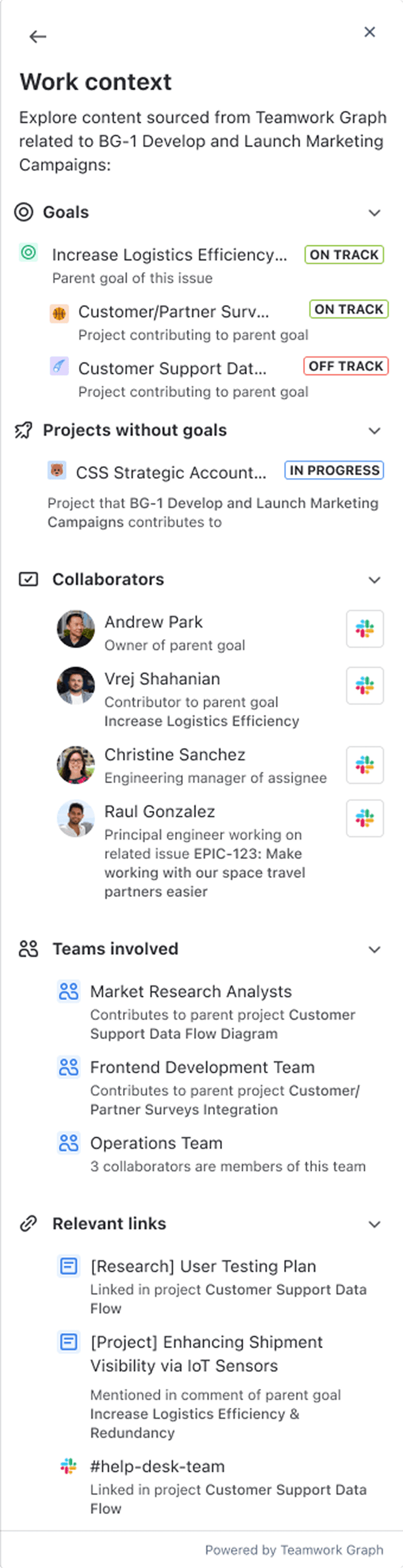
This research aimed to validate key assumptions behind the design of the Work context feature (AKA Object Navigator) an experience intended to reduce context-switching, improve cross-product visibility, and surface relevant connections between work and knowledge so we can ship a context panel that customers find helpful and relevant to their work.
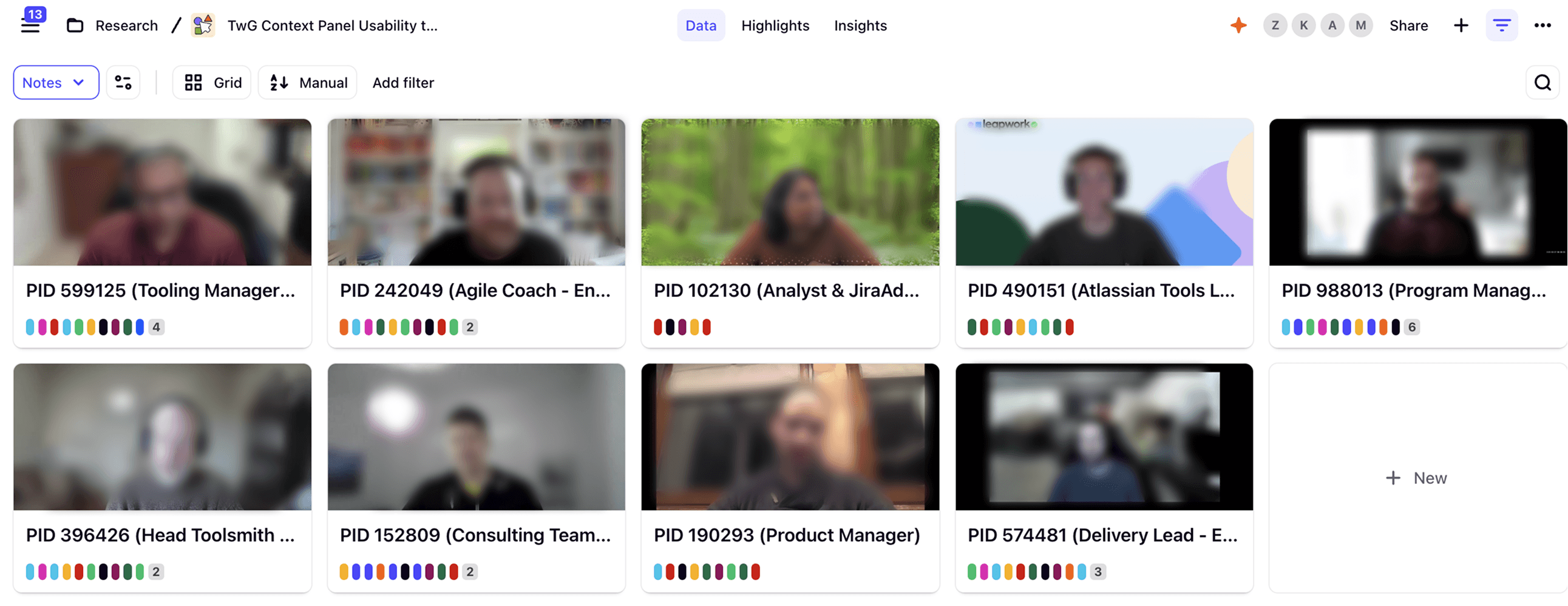
User Test
💡 Recommendation
💡 What was the Outcome?
The majority of our research hypotheses were validated
The hierarchical panel design for Jira got an SEQ 5.67
With the learnings we had from the research, we applied them in our next iteration of the Context Panel
Shipped prototype on time for the Team 25 booth presentation, where we had the opportunity to gather more user feedback
The sessions
The research sessions engaged enterprise users across roles working in Jira and Confluence daily. The team tested two design prototypes (hierarchical and grouped layouts), while also exploring foundational concepts around how users find, understand, and connect related information.
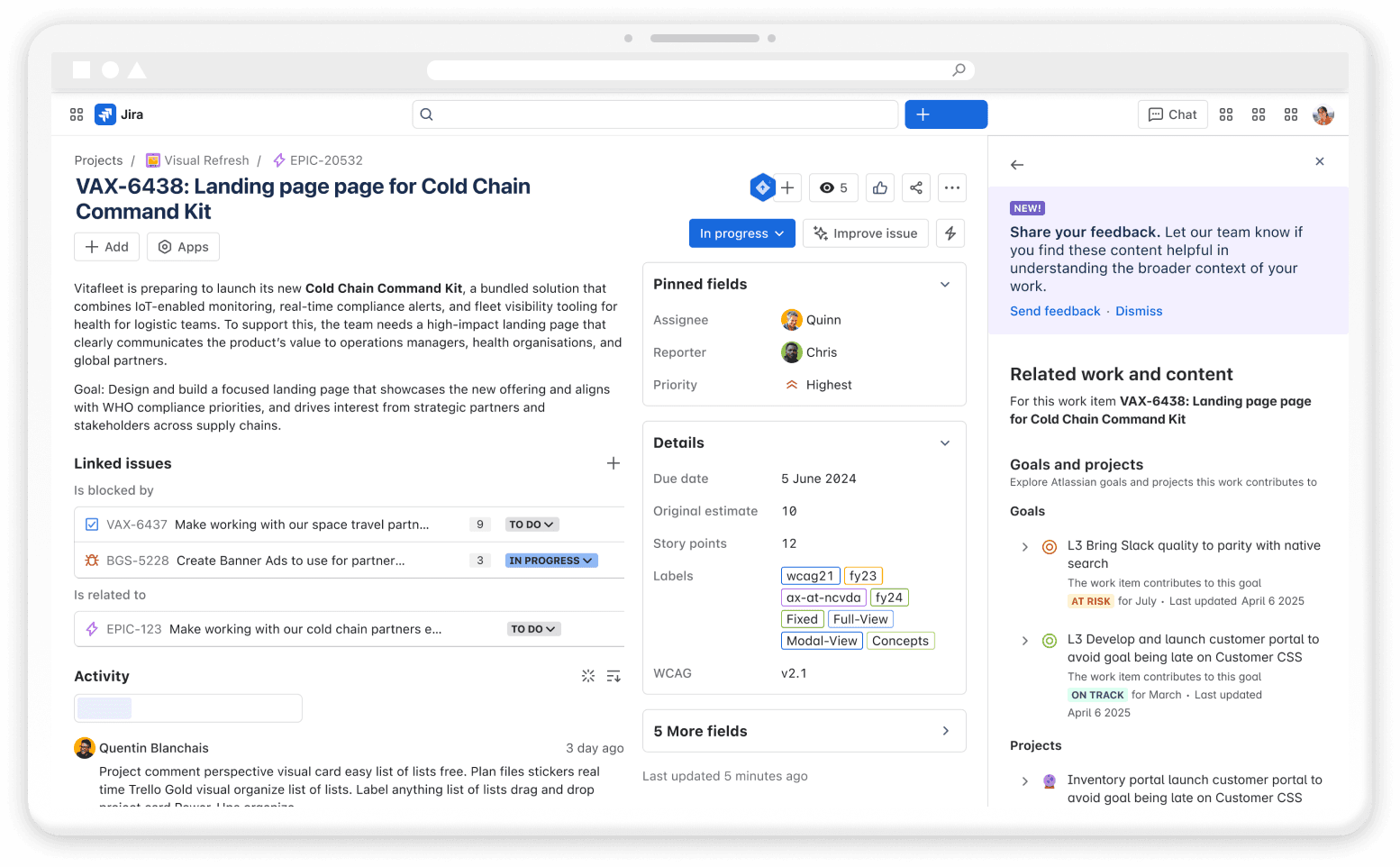
Jira:
Testing entry: Rovo AI button
IA: Goals, projects, other content and links
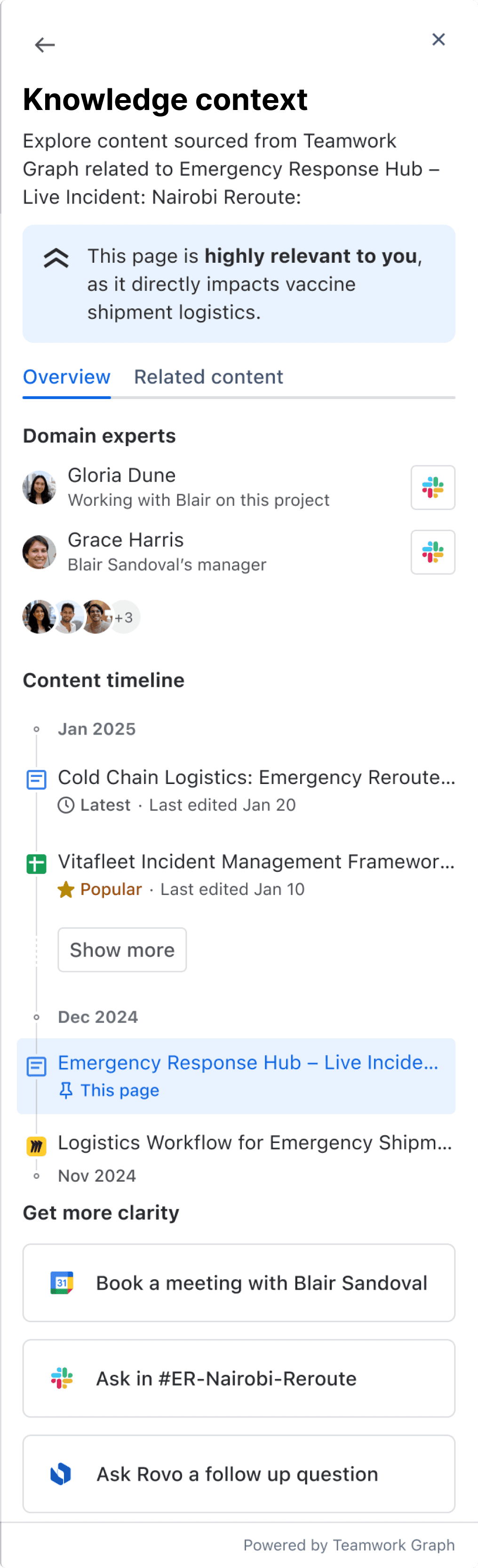
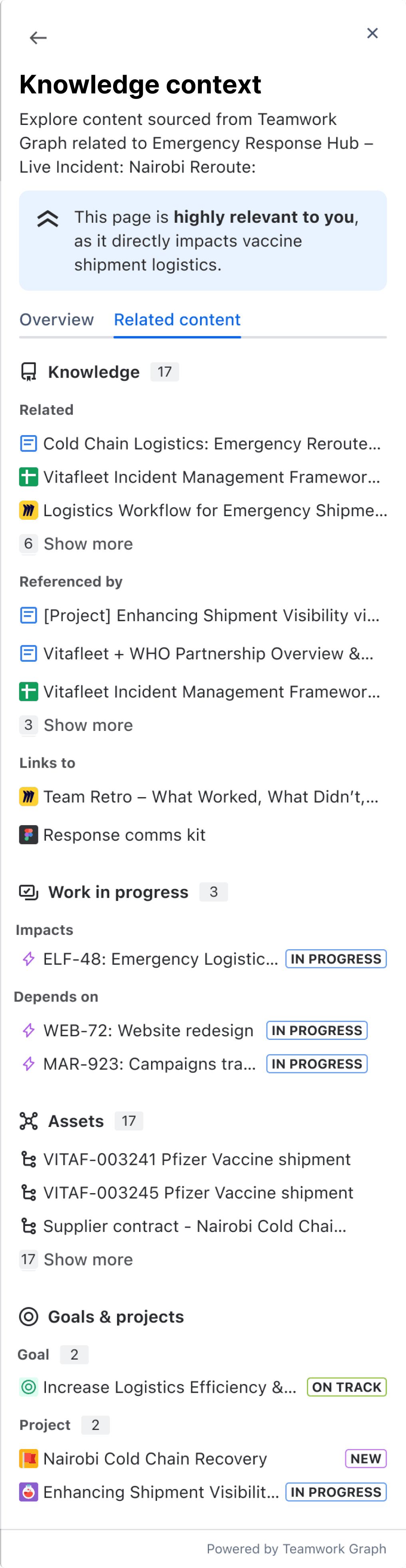
Confluence:
Testing entry: Rovo AI button
IA: AI Topics, other content and links
Methodology
15-minute generative interview
40 minutes usability (Jira & Confluence context panel)
Research Period
3 days between 26-28th of March 2025
Participants
9 users (Work user, Knowledge worker - Cloud Enterprise (1000+ employees)
Key chart:
HIGH CONFIDENCE
Heard or inferred from the majority of the participants
MEDIUM CONFIDENCE
Heard from some of the participants OR dependent on the task/role/situation
LOW CONFIDENCE
Participants didn’t experience it or mention it, didn’t prompt - requires further testing
Research Outcomes
Hierarchical view - Progress with the hierarchical view based on the feedback
Discoverability - There’s currently a low level of familiarity with the Central AI button and its features, and therefore we expected discoverability to be poor.
However, as this is a quick to ship learning experiment that needs to have a cross app entry point, the AI button provides this for now and aligns with direction given to the project.
We recommend:
Continue to partner with Central AI so we have close awareness of the Rovo button hitting GA. At this time educate customers on Work Context while it continues to live inside the AI entry point in the near term.
Future state we are looking at other entry points, such as ambient or embedded experiences, to host the contextual information long term.
Gather data - Run further customer sense checking and user testing (e.g through Team 25 booth) to continue shaping the experiment.
Research Outcomes
Content specific - Adjust the work context data to uptick terminology where necessary and tailor the UI based on feedback for Knowledge Context presentation.
Information Architecture - Some inconsistencies between the information hierarchy of the 2 side panels slowed some participants in understanding the sections layout. → Explore the information hierarchy to see where we can reduce cognitive load by using the same content structures across the products. More info: 30% UX review - Context panel in Confluence
Split testing - Further testing both Jira and Confluence in combined sessions to assess if there’s SEQ impacts with subtle differences in layout between Work Context and Knowledge Context.
Iteration & Handoff
05
We further refined the designs for both Jira and Confluence context panels then built all specs.
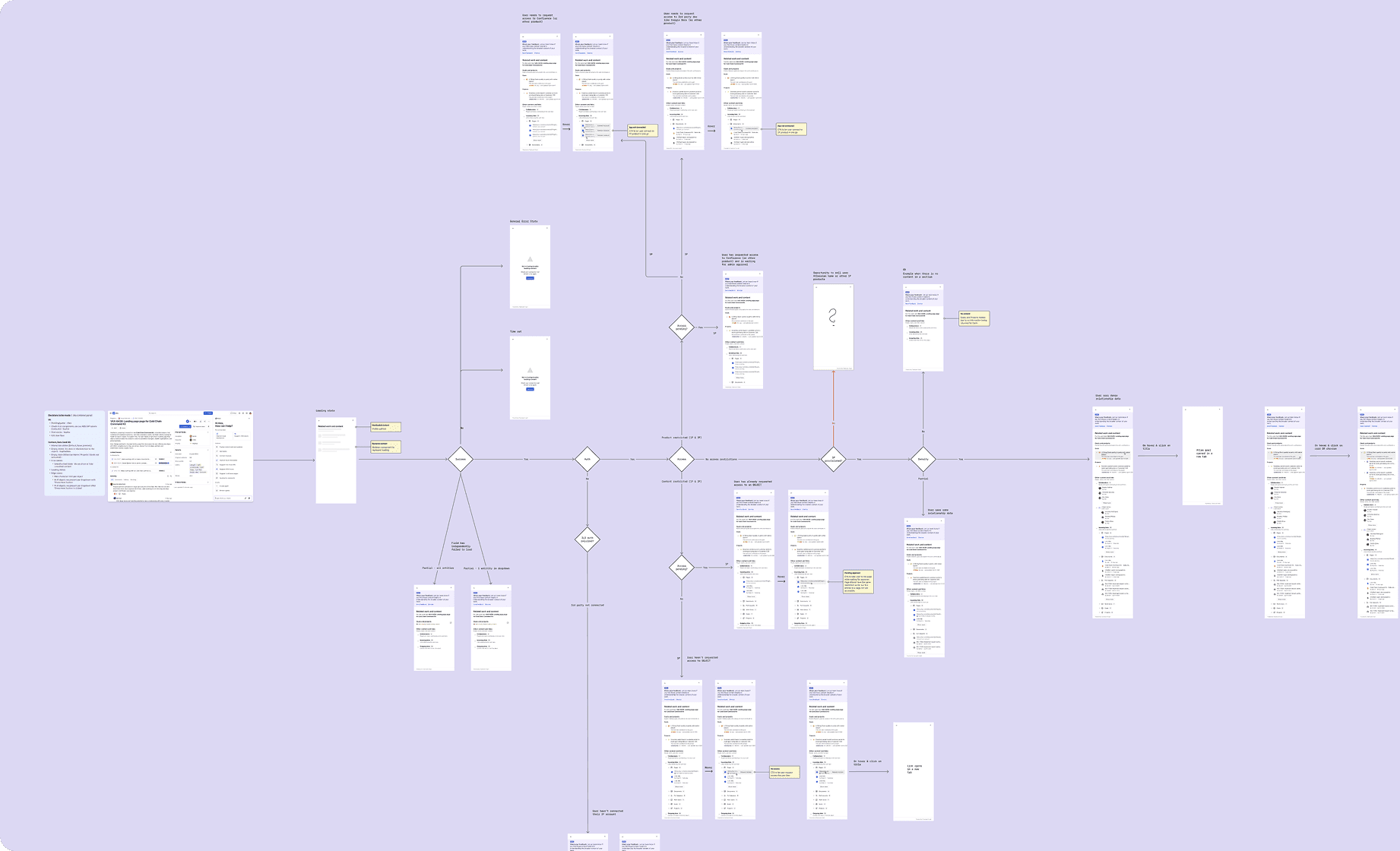
User journey / Teamwork Graph Component Library
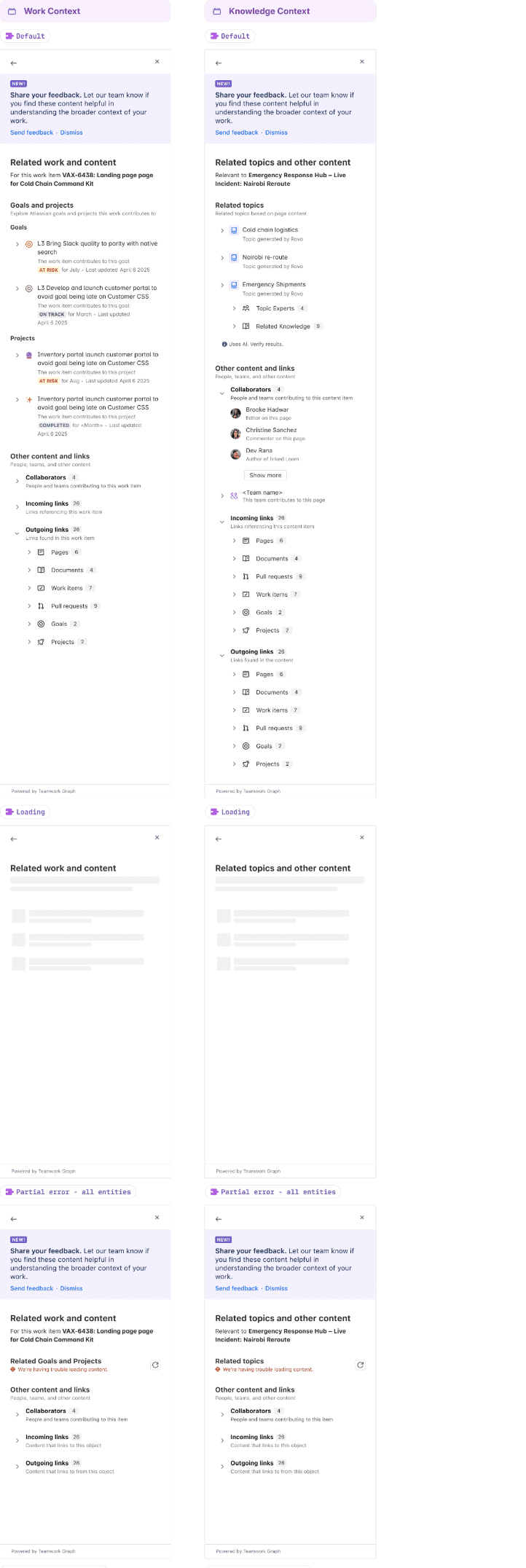
UI Screens, Modules, Molecules / Teamwork Graph Component Library
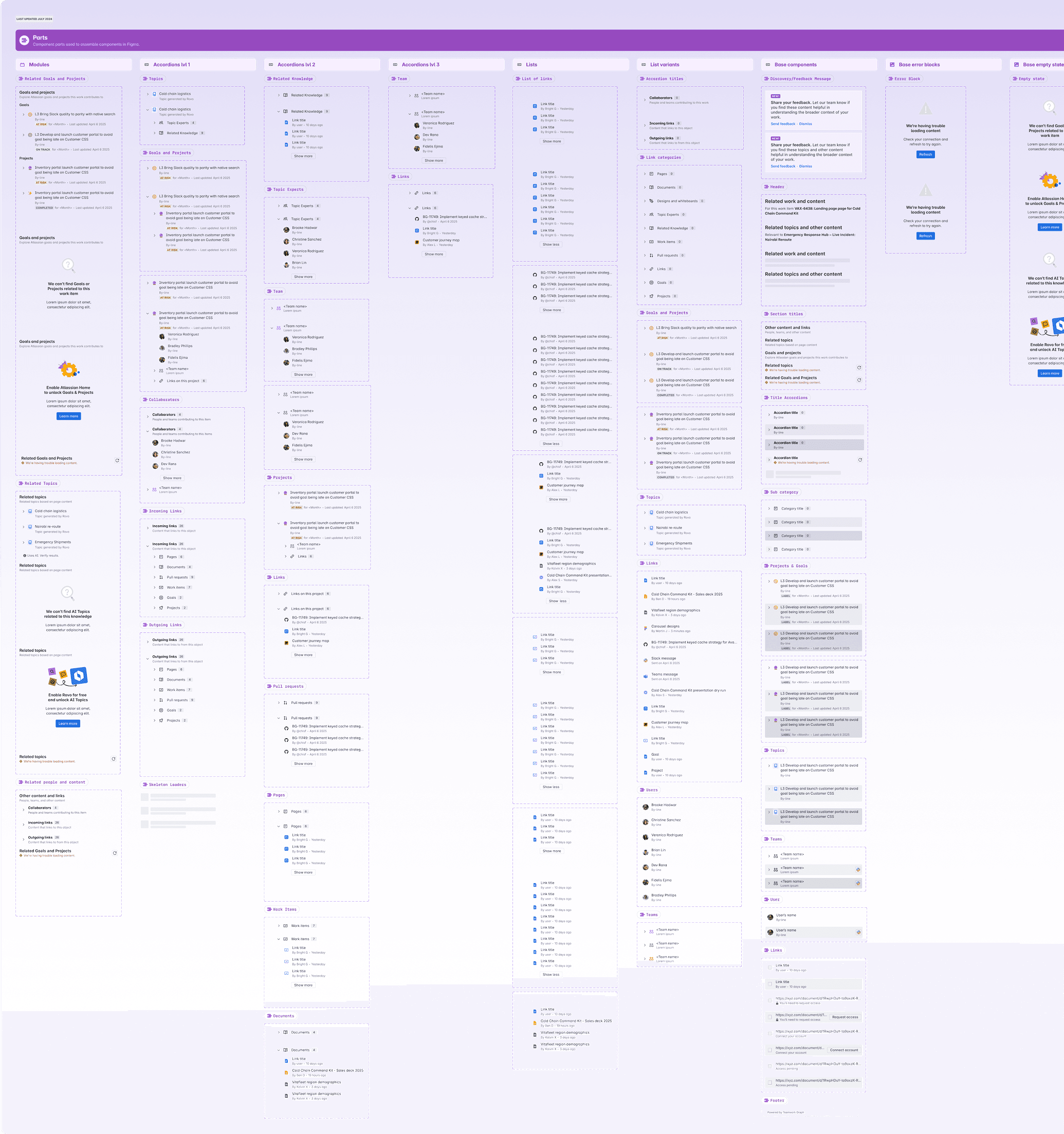
Design system:
We built the design system component library with customizability and flexibility
Implementation:
Collaborated with engineering for seamless handoff and implementation.
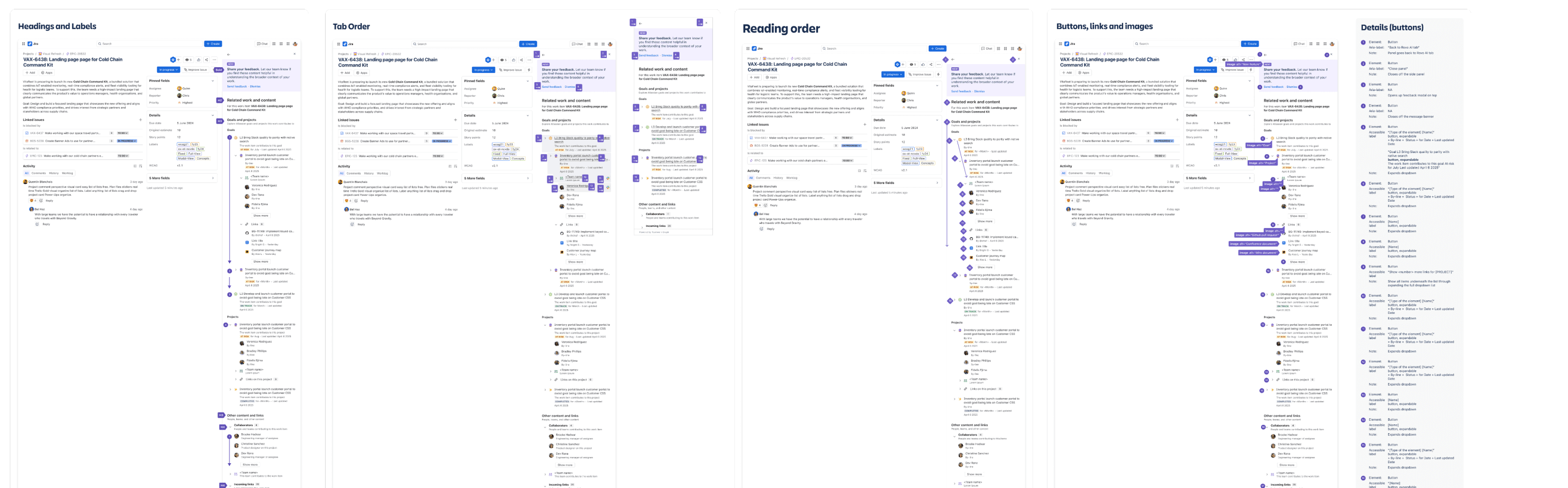
Accessibility Annotations / Teamwork Graph Component Library
A11y:
Built accessibility annotations library with specifications to meet with the minimum accessibility global company standard.
Challenges & Solutions:
Addressed technical constraints and refined designs based on feasibility.
AI vibe-coded prototype
Created a Cursor prototype which I deployed through Netflify to show developers how I’d like the animation to look like
Results & Lessons
Impact:
Improved navigation and context-switching for users, leading to 65% increase in finding related contextual information on any work or knowledge object.
What worked well:
Cross-functional collaboration and iterative design process.
What I would do differently:
Explore more ambient experiences for context delivery.